 System Explorer 7.0.0
Screenshots of System Explorer
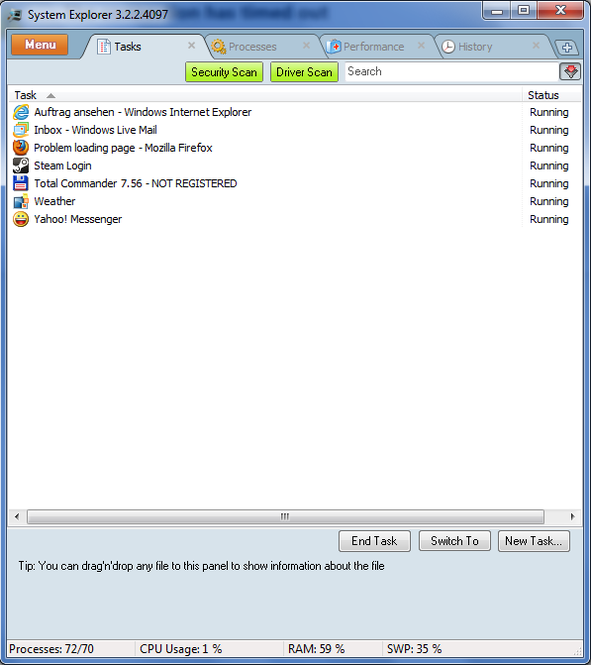
System Explorer Editor's Review
Keeping your system clean and secure is not an easy task, especially if you use the default applications offered by Microsoft. Installing additional programs might become a frustrating job, especially if the results are confusing. So, what better thing to do but to try out System Explorer: an application that combines both the clean aspect and security issue of your computer.
System Explorer is not an antivirus, nor a registry cleaner. It's more of an upgraded Windows Task Manager with additional features. Not only that you can view all the active processes, startup applications, system services, but you can also see details from each enumerated component based on the producer's own data base (which is quite impressive). In case you want further details related to a single process or application, System Explorer offers access to third party web sites such as ProcessLibrary.com or Google.com. At startup, it can also perform a virus scan with an online antivirus tool. This way you can detect any harmful process and search its roots.
System Explorer comes with a left side tree panel from which you can choose all its main features and a Windows like menu from which you can choose to build a system report, or to access all the system utilities present in Windows operating system. There is also a live icon hidden in the taskbar from where you can check your system usage: CPU usage, memory usage, swap usage, battery usage (in case you run the application on a laptop). Unfortunately you have to rely on your knowledge about computers and your intuition, as System Explorer comes with no hints, system or a virtual manual. In case you are stuck, all you can do is to access the Online Help which at this moment is not available.
Compared to the normal Windows Task Manager, System Explorer offers a new level of control in manipulating any active process or application. You can set priorities for any selected process, delete items from startup or uninstall applications.
Pluses: free, free home-build database, high level of processes control, live system usage monitor, ProcessLibrary.com integrated, online virus scan;
Drawbacks/flaws: no helping guidelines;
In conclusion: A complete task manager with unique features that gives full access and rights to manipulate any kind of process, service or application.
System Explorer Publisher's Description
System Explorer is free, awards winning software for exploration and management of System Internals. This small software includes many usefull tools which help you Keep Your System Under Control. With System Explorer You get also fast access to File Database which help you to determine unwanted processes or threats. * Detailed information about Tasks,...
Read moreOther Languages
Look for Similar Items by Category
Feedback
- If you need help or have a question, contact us
- Would you like to update this product info?
- Is there any feedback you would like to provide? Click here
Popular Downloads
-
 Macromedia Flash 8
8.0
Macromedia Flash 8
8.0
-
 Kundli
4.5
Kundli
4.5
-
 My Talking Tom
1.0
My Talking Tom
1.0
- FastSum 1.9
-
 FastSum Standard Edition
1.6
FastSum Standard Edition
1.6
-
 Cool Edit Pro
2.1.3097.0
Cool Edit Pro
2.1.3097.0
-
 Cheat Engine
6.8.1
Cheat Engine
6.8.1
-
 Hill Climb Racing
1.0
Hill Climb Racing
1.0
-
 Windows XP Service Pack 3
Build...
Windows XP Service Pack 3
Build...
-
 C-Free
5.0
C-Free
5.0
-
 Tom VPN
2.2.8
Tom VPN
2.2.8
- HP LaserJet 1100 Printer Drivers 4.3.2.5
-
 Horizon
2.9.0.0
Horizon
2.9.0.0
-
 Iggle Pop
1.0
Iggle Pop
1.0
- HP WLAN 802.11a/b/g W500 2.4.1.30
-
 Mozilla Firefox
108.0...
Mozilla Firefox
108.0...
-
 FormatFactory
4.3
FormatFactory
4.3
- HP Deskjet 5400 Series (DOT4) 9.0.0.0
- HP LaserJet 4200 PS 60.3.14.2
-
 Vector on PC
1.0
Vector on PC
1.0